Turn one sprite into a game animation
Choose a character, set the motion and frame count, then preview a seamless loop before exporting a transparent GIF.
Production workflow
From one sprite to a reusable motion loop
Keep the character identity fixed, choose the action the game needs, then inspect every frame before export.
Choose the source
Start from an existing character so outfit, palette, equipment, and silhouette stay recognizable.
Define the motion
Select a common game action or describe a custom loop, then set the frame count and generation method.
Preview and export
Check timing frame by frame and download a transparent GIF for prototypes, engines, or review.
Built for game teams
Create the motions players read instantly
Movement loops
Build idle, walk, run, and jump cycles for player characters, companions, and NPCs.
Combat feedback
Create attack, hurt, and death actions with silhouettes that remain clear at game scale.
Custom actions
Describe emotes, interactions, spell casts, or mechanics that are unique to the game.
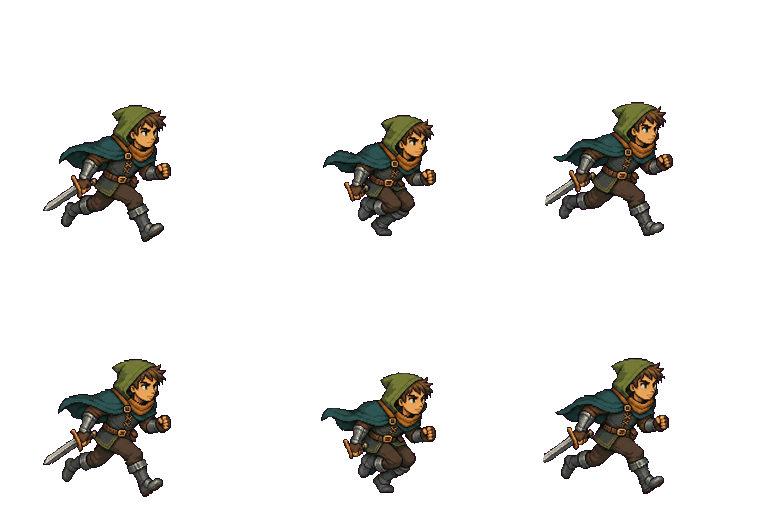
Inspect every frame
The loop stays visible before export
Playback controls and the frame timeline make timing problems easier to spot while the source character remains unchanged.
- Frame range
- 4-14 frames
- Motion presets
- 7 + custom
- Export
- Transparent GIF
Common questions
Before you animate
Which source sprite works best?
Use a transparent character with a clear silhouette and enough empty space around equipment, hair, and clothing to move.
How many frames should I choose?
Six to eight frames suit many compact game loops. Use more frames when the action needs a smoother arc or clearer anticipation.
What is the difference between Standard and Advanced?
Standard produces an animation sheet faster. Advanced uses a video-assisted motion pass for smoother movement and uses more credits.
Can I create a motion that is not listed?
Yes. Choose Custom and describe one action, including how the character should return to the starting pose.
Start with one character
Choose the motion. Check the loop.
Turn a static sprite into a transparent game animation without leaving the tool page.